Tsert::OS©®
is
our Linux distribution
for x86-based
systems; it
includes:
- a browser-centric
desktop,
- a
built-in search-engine,
- an HTML
Templating©®
engine,
- a search-dialog Tsert::OS SearchDialog©® ,
- a package tool Tsert::OS Packager©®,
- an archiver Tsert::OS Archiver©®,
- an information
retriever, Tsert::OS Ferret©®,
and
- TCP/IP
networking, X-Window
server, etc.
The
Operating System
The operating system is a Linux-based
OS. A BSD
one will be added.
The
File System
The file system
used in Tsert::OS®
is a journaling file system (reiserfs). Access
to files is administered by the built-in search-engine. A newly added
search partition is divided
into the following sections:
| Ferret |
Where downloaded files are indexed, and stored
when
specified. |
| Config |
Where indices for all system configuration
files are
stored. |
| System |
Where indices for all systems files are stored.
|
| Share |
Where indices for packages are stored, and
indexed. |
| User |
Where all user files are indexed, and stored. |
The future version of Tsert::OS©®
will include a completely new file system (Tsert::OS
path-spec file-system, TFS [ Patent
Pending ]), which relies on a single-level
storage structure with
no folders, and unique keys pointing
directly to files. The filesystem is made-up of three distinct sections: vertex, index, and inode.
What used to be folders are seen as vertices in a graph; since they are
simply pointers to a location. Mount points can be mounted hidden. i.e.
only a guard application can access files under the mount point; and every other applications must issue a request, using the SALT protocol. Indices are keys used for searches.
The new
file-system, being path-spec based, will allow access
to files,
through the same path-spec search functionality used by
our
search-engine. The path-spec
formalism allows boolean searches on keywords
making the
file-system path of a given file. For example, searching for files with
the path-spec
criteria:
/sales
& (
/car | /truck )
will return all files that were saved with the keyword sales in their path
specification,
along with either car or
truck.
The first version of the Tsert::OS File System (TFS) will be based on the BSD-FFS file-system. Directory scanning becomes a simple search on path-spec keys, since there are no longer any folders to be seen. File
retrieval is also performed as a search request. In the second version of TFS®, database features will be added, using its path-spec
capabilities; which will allow the retrieval of database rows, that are
linked together on-the-fly, and returned to the calling application.
The primary and secondary keys will be used as path-spec keys in the file system.
User
Interface
The user
is given three ways to interact with the system -- a shell,
a browser,
and a Launcher.
The graphical user interface is anchored on the Thin::Window
and
the Launcher,
and uses the KDE
window manager. Preferences setting is
provided mostly by HTML
pages.
The
KDE Kicker
panel is
re-organized, and the Tsert::OS® Launcher is always visible.
The KDE
file
dialog is modified and
becomes the Tsert::OS®
search
dialog.
The KDE menu button and the
taskbar
applet are removed, and are not
part of Tsert::OS®.
We deem them too Microsoft-like;
instead the Tsert::OS® Launcher
and
the virtual pager are used.
Basic applets and applications, chosen for their functionality, are set
by default by Tsert::OS®.
These applets and applications are the following:
- The Control
Center - to configure
your desktop.
- The System
Applet - to access
floppies, CDs, files systems, or the network.
- The Quick
Browser - to browse content (extracted
by NLP
content
analysis) or folders.
- The Print
Manager - to manage
printing tasks.
- The Logout
Applet - to change or
exit from a user session.
- The Screen Lock
Applet - to lock
your session.
- The Virtual
Pager - to access
virtual desktops and windows.
- The Tsert::OS® Search Bar - to
make search queries.
- The Tsert::OS®
scrollable Tool Bar -
to invoke
applications selected by the component chooser.
- The Trash Can -
to remove or
recycle files.
- The System Tray - to keep track of instantiated
applications.
- The Date/Clock Applet - to display current date and
time.
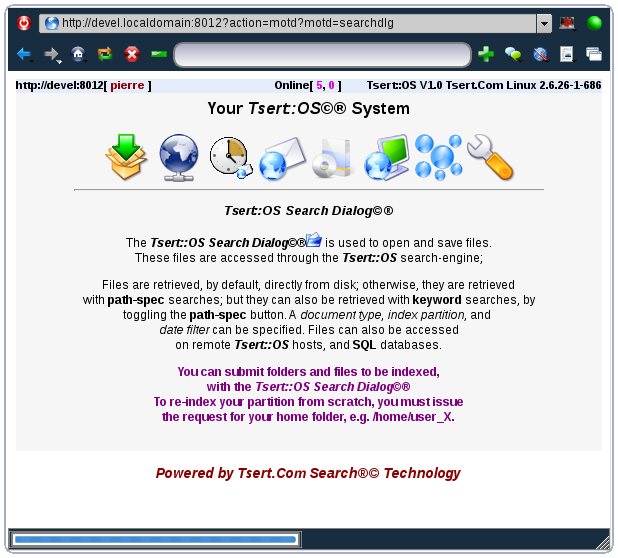
Messages Of The Day
Tsert::OS MOTD(s)©®
allow you to display company or deparmental info pages to your users.
The security manager responsible for content management is the one
responsible for managing and updating MOTD(s),
The Tsert::OS
itself, has by default, system and user interface information as MOTD(s).
These
system MOTD(s)
can be replaced by the security manager -- see intro,
archives,
synchronization.
Reminders
Tsert::OS
Reminder(s)©®
are messages that temporarily appear on your screen informing you of
problems with the system, possible intrusions, clues on how to do
things, arrival of priority email or other types of message, etc.. Only
basic system and miscellaneous reminders can be turned-off.
High-priority reminders cannot be turned-off -- see search-reminder.
The Tsert::OS
Reminder(s)©®
system provides a simple way for users to exchange messages akin to
visual texting
or email,
(texting
was in
Unix systems with the commands mesg,
write,
and talk.)
The complete reminder
subsystem will be provided along with the Tsert::OS
Email Browser.
Indexing
& Searches
The Tsert::OS®
indexing engine uses a /etc/fstab- like
file /etc/ifstab.
It uses
the afore-mentioned configuration file, whenever an indexing of the
entire system is desired. The configuration file specifies all the
paths that are to be indexed, who the owners of these paths are, and
how these paths are supposed to be indexed, (what type of files should
be
indexed, which ones should be ignored, and if inflating zip/gzip
archives should be done before indexing).
When
saving a file, the system automatically indexes the newly saved file,
and may do a content analysis, with the NLP
engine to try to understand the content of the file. Content search is
made possible, because of that analysis. See
some preliminary results with the
following files.
Tsert::OS®
provides several ways of retrieving files:
- the first is by
trigerring
a keyword search, as in all search-engines.
- the second way
is to trigger a
content search, using a set of keywords.
- the third is to
retrieve file(s)
by specifying a file name or file type.
- the fourth is
to retrieve file(s)
by specifying an actual path specification.
The search-engine sees the
path specification, (path-spec
searches), as a slash-separated set of keywords, e.g.
/bin/search.
Remote
Connections
Tsert::OS®
is straightforward in its ability to allow remote connections. The
system relies and is anchored on a search-engine
mimicking an Internet search-engine accepting search queries, and
protects these connections with our SALT protocol©®.
Connecting to your Home Computer
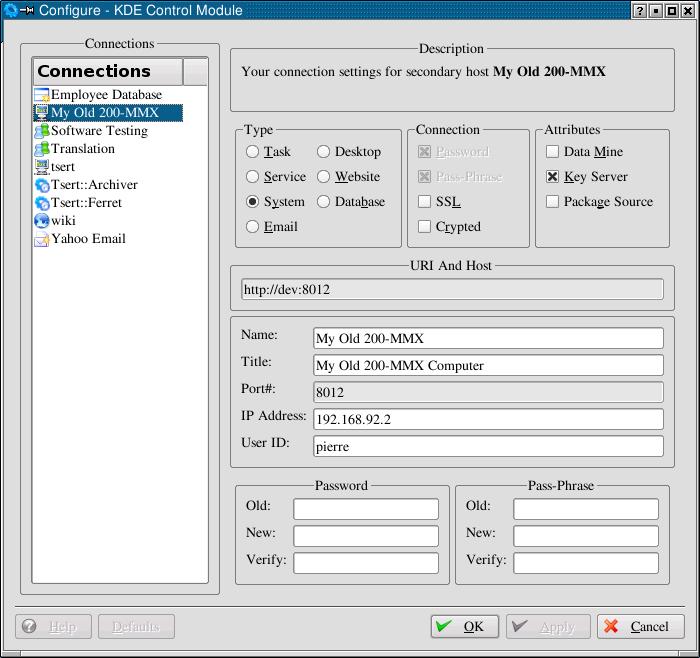
You can turn-on remote connections by changing your
remote
connection preferences with the Connections manager.
In order to be
able to establish a remote connection, you simply log into
another machine, which could be your laptop, also
running Tsert::OS®;
you then access the login
UI-page
to access your home computer through your home computer's Tsert::OS address
and port
number 8012®.
The connection is established, as long as your home computer's host and
domain name can
be resolved (dynamic DNS service), as for a real internet website. You
then simply
issues search request for files as if you were working on your home
computer.
Connecting
to Other Computers
Connecting to other systems from your machine is
accomplished as above; but you must have an account on the machine you
wish to access. The security manager of the remote machine must have
provided you with an account with password and optional pass-phrase.
You must
then supply that information through the login UI-page
to access the
remote machine.
Thin::Client©®
Systems
This remote connection
capability is the
basis for future Thin::Client©®
implementations. Thin::Client©®
features will be offered with the server version.
Users will be able to connect to a server, acting as a central
repository of indexed and content-analyzed files, through a thin client
terminal; by simply accessing the Tsert::OS® port
8012,
using the login UI-page.
The Thin::Client©®
machine connects to the repository at boot time, using pre-configured
remote connection
settings.
The
hardware requirements for such a Thin::Client©®
server,
are
obvioulsy more than for the desktop version. The preferred platforms
will be, either an Intel Pentium-4, equivalent Athlon, or a 64-bit
server, with at least 1G of
memory; and the disk space required to store hundreds of gigabytes of
files. To allow Thin::Client©®
terminals to run applications on the server itself,
a faster or multi-processor server will be required, preferably a
multi-processor server.
Tsert::Ferret©®
willl allow users, whose
companies
have such a server running, to schedule a daily ferreting run
(information retrieval task) on the repository. Tsert::Ferret©®
will then produce a content
analysis report which contains paragraphs (blurbs) of text, extracted
from the returned files, which seem to talk about what the user
specified in their ferreting query.
Another future way
to remotely connect is through the Tsert::Collab©®
component. Tsert::Collab
gives the user the ability to setup a collaboration session by sharing
a session-id with other users. Once a connection is established with
another user, you can then collaborate on an HTML page displayed in an
HTML editing window. Out-of-Band messages in the Tsert::Collab©®
component arrive as Tsert::OS
reminders.
Components
Manager
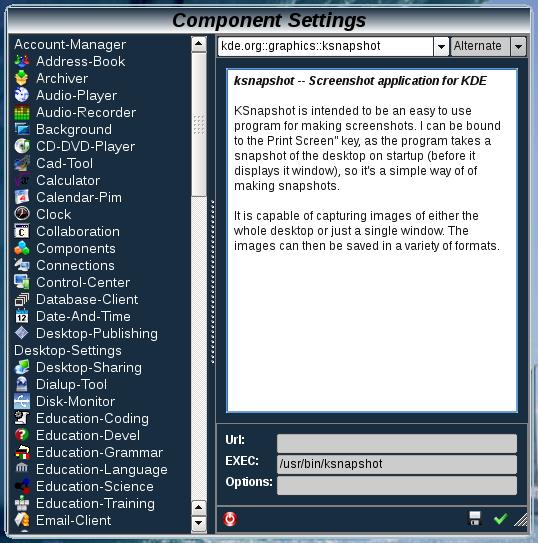
The component manager is a KDE application
that is totally modified by Tsert Inc. It
is simplified and made to configure your desktop according to the type
of applications you wish to use. Every type of application is listed,
and the user selects their application of choice, for each
type
of component (e.g. office-suite, word-processor, email-client,
instant-messenger, personal information
manager, music
player, etc.)
The applications selected in the components manager are
displayed in the
toolbar, found both in
the kicker
panel and the Tsert::OS UI pages.
The components
manager, and all
other KDE
Control-Center
system-setup widgets, will be converted into Tsert::OS UI
pages.
Security
The security provided by Tsert::OS®
is built-in, by the simple fact that most, if not all access to files
is controlled and compartmentalized by the search-engine. Users
including the root
user is not allowed to browse through folders or to look at the files
of other users (incomplete without the Reiser filesystem plugin.)
Remote connections are protected by the SALT©®
and SSL
protocols. The Karakul©®, Kodiak©®,
and
Katmai©®
BSD versions of the Tsert::OS®
operating system will include our Tsert::OS
Salt protocol©® at the level of the IP stack to allow secure networking without the need of a firewall
(as long as, only salted ports can be opened.) It is the salt-setting that is
exchanged securely
among peers in a private network, allowing each peer to match a given
key. The matching
may be done at the level of the IP,
TCP,
or HTTP
protocol level. You will be able to make your network both
public and private; because the Tsert::OS
Salt protocol©® allows the use of a given number of
reserved algorithms.
Access to other files, (system, package
or ferreted files), is allowed only if the user making
the request has access to the specified files. Content information,
see NLP
engine.
Style-Sheets
& Templates
Tsert::OS®
gives the
user the freedom to provide his/her own UI pages, as long as, places
are
kept for Tsert.com.
copyright, trademark, launcher, and logos. This capability is provided
by allowing the user to specify XSL(T)
style
sheets or HTML &
CSS templates.
Tsert::OS®
uses
these style sheets or templates to generate User-Interface (UI), Tsert::Packager,
Tsert::Archiver, or Tsert::Ferret
HTML pages.
see template-1
and template-2.
This php-like capability
of dynamically generating HTML pages
will be included in the Tsert::OS script
language,
found in our integrated testing environment (ITE).
Future Enhancements
XML-Based
System Configuration Files.
Subsequent releases of our operating system will
use XML, as the document format for all system configuration files,
e.g. fstab.
All configuration files, such as the files found under the /etc
folder will be translated into our XML DTD, for system files.
Developer
Version
A fully-integrated developer version of Tsert::OS®
will
be released, which incorporates our ITE, updated
with Tsert
UI pages, development life-cycle and
process. All of our development tools will be provided, as part of that
release. This version will be able to
serve a small team of developers (between 25 and 100 users).
Translation
In the future, we will allow the user of our
operating system, the ability to automatically upload their document
files for translation, through our translation service.
Testing
In the future, we
will allow the user of our
operating system, the ability to automatically upload their source code
files for testing, through our software quality assurance service.
Back
to Top